Home / Cases
CASE STUDY · ASKLIEN.AI · MY OWN BUSINESS

I don't build anything I don't use myself.

This is an odd case study because I'm the client. It's also the one I can be most open about. If I'm asking you to trust AI in your business, you should get to see how it runs in mine. AskLien is a small team, and I'm the founder. Below is how a small team handles the workload of a much bigger one.

Based in Belgium and MiamiProject run in DutchScreens translated to English for this page
7agents that run on a schedule every week
13skills of my own, each handling one task
4,900+emails sent automatically
1rule: a person reads everything first
One project, from first call to follow-up
  1. 1Intro call
  2. 2Proposal drafted
  3. 3Audit day
  4. 4Report
  5. 5Project in the hub
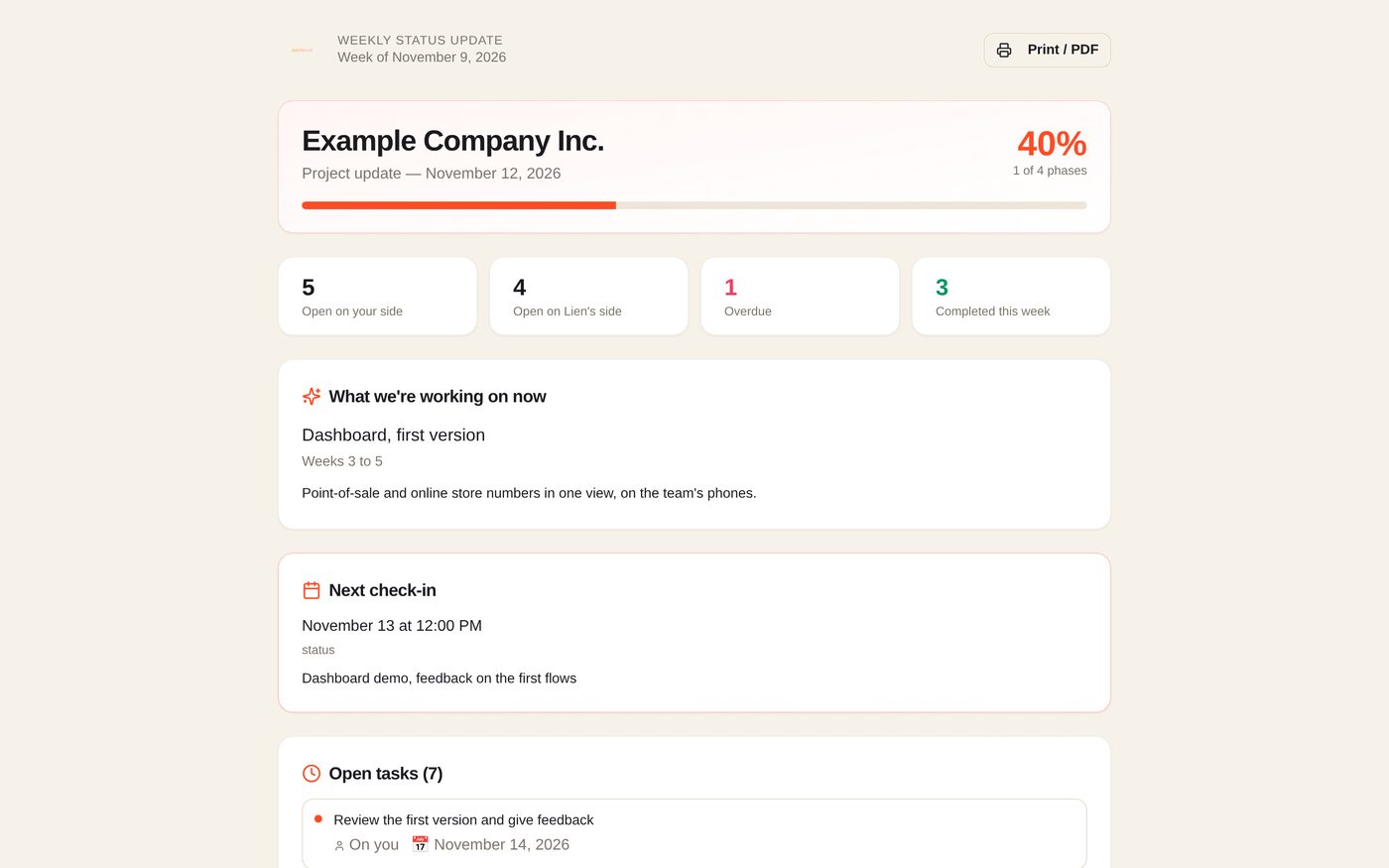
  6. 6Weekly status report
The AskLien hub · demo data
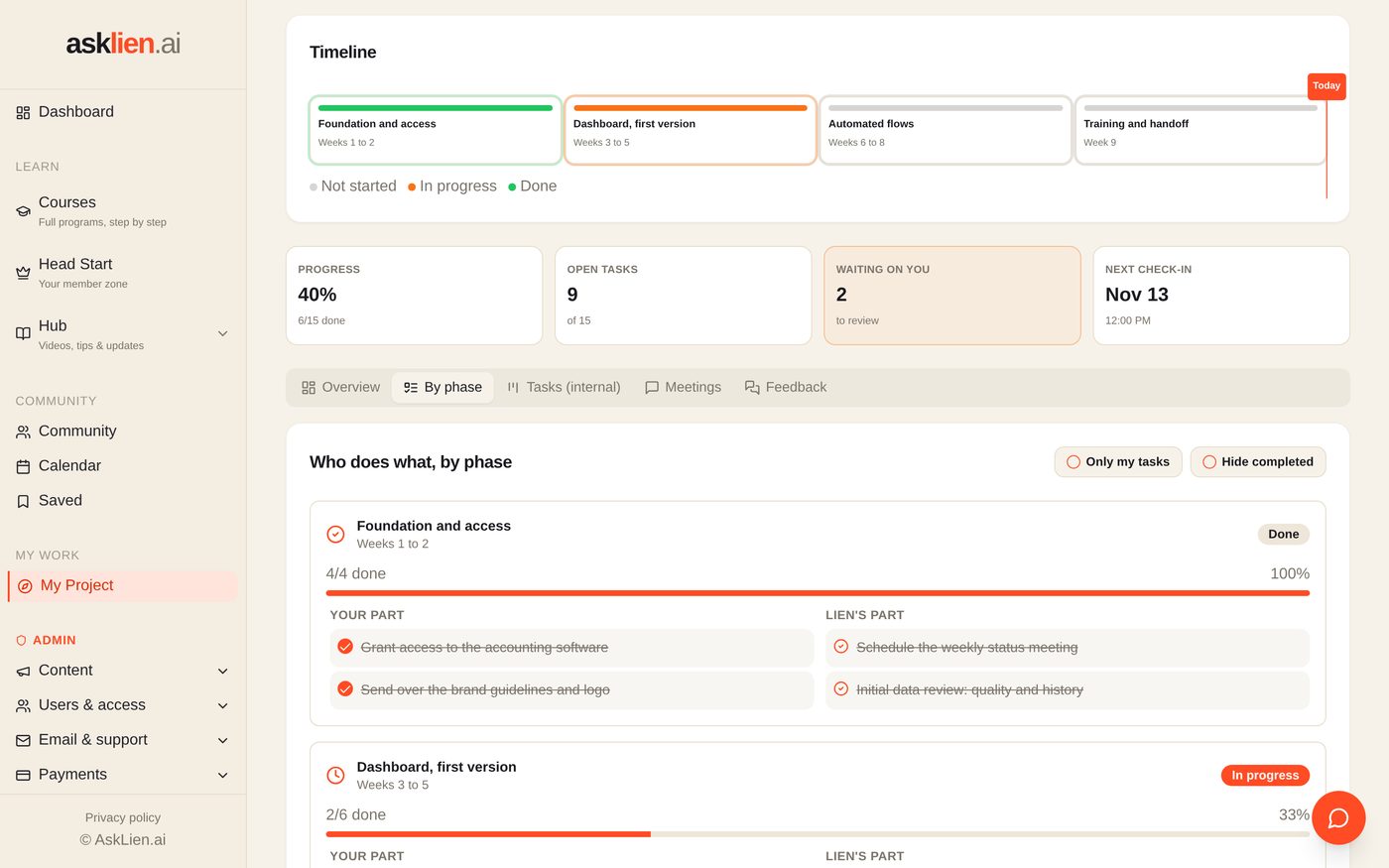
What a client sees: the project in phases, and who does what.
The AskLien hub · demo data
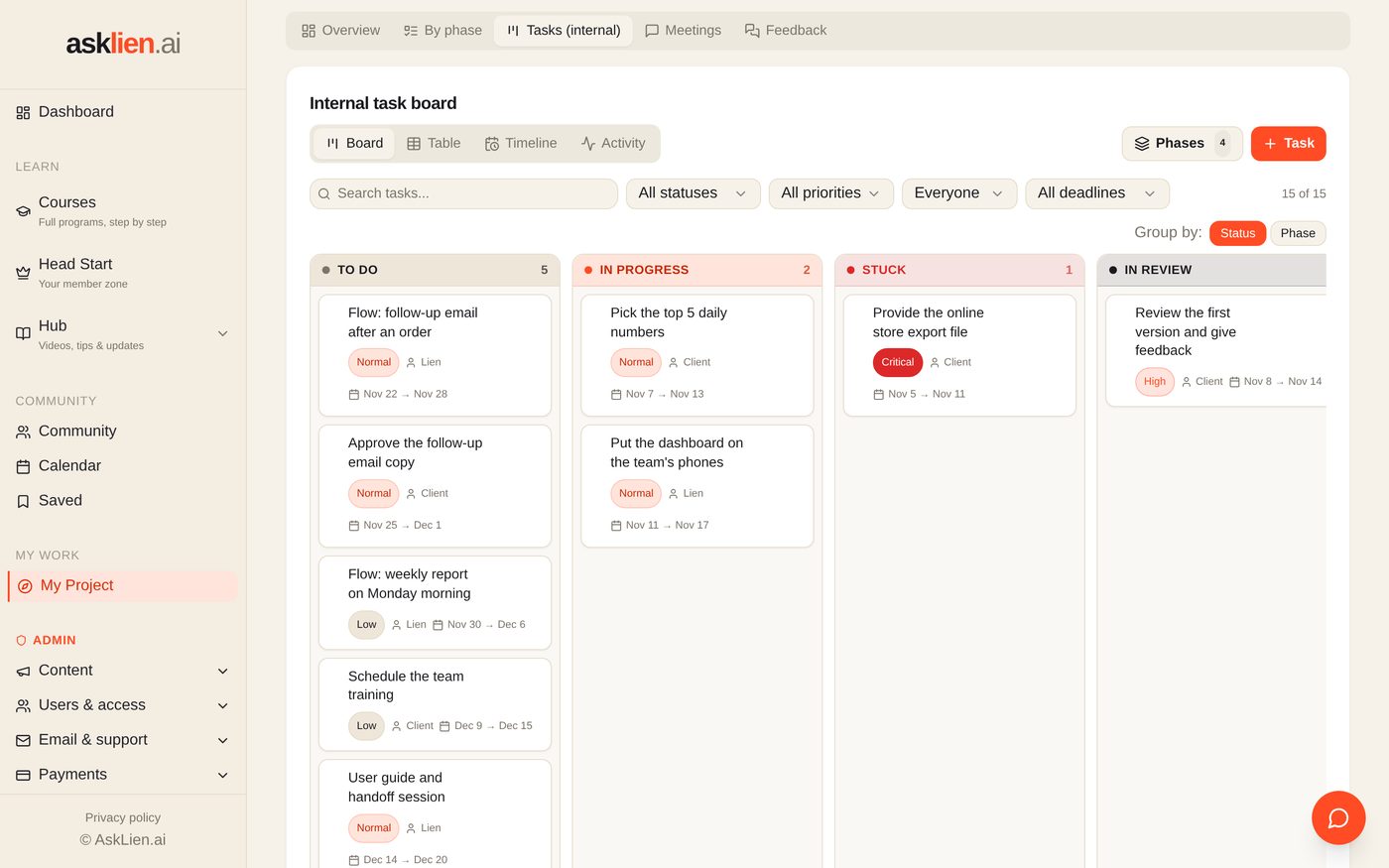
The task board: every task has an owner, a priority and a deadline.
The AskLien hub · demo data
The weekly status report, put together automatically.
The AskLien hub · demo data
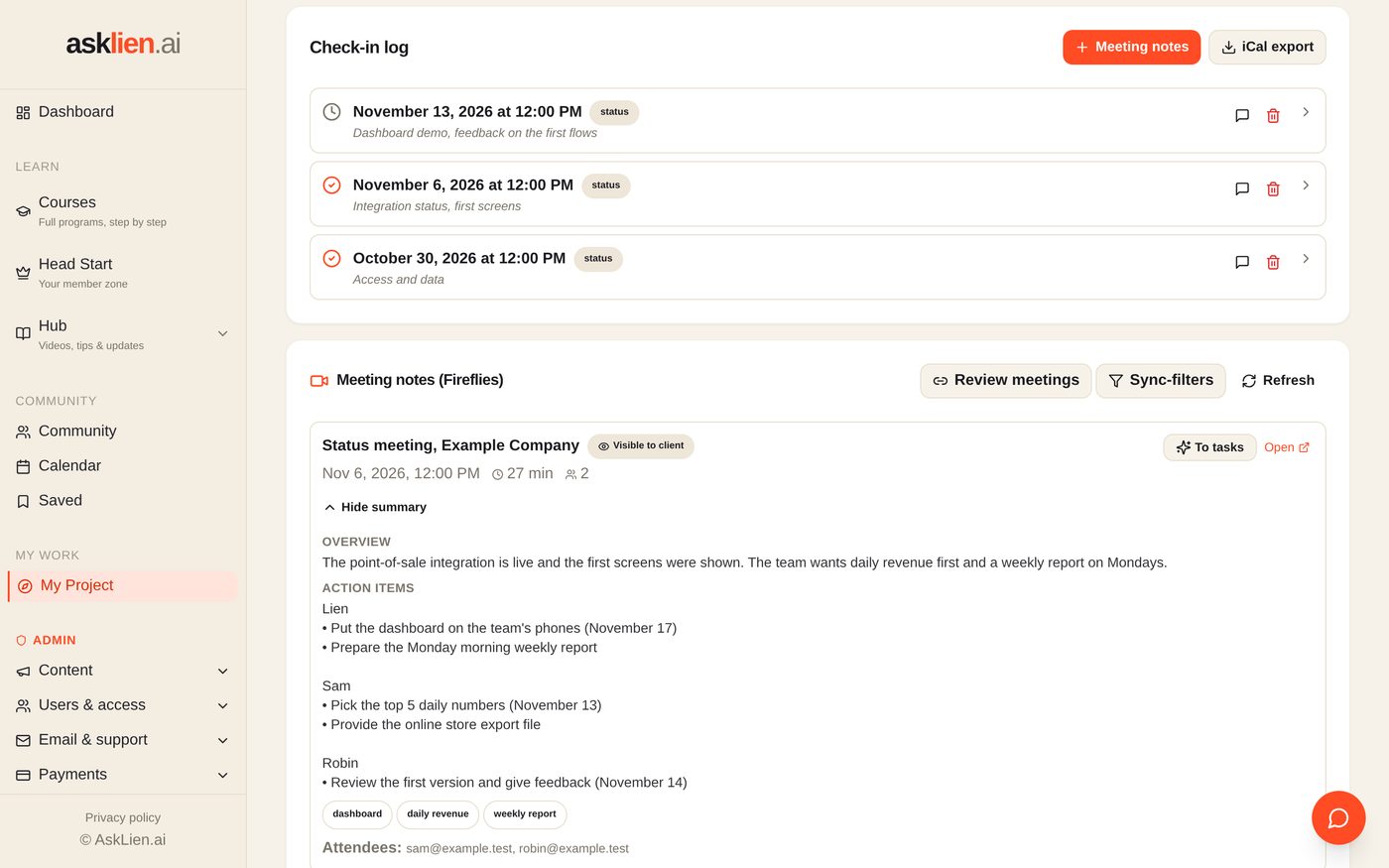
A meeting comes in on its own, with action items per person.
The AskLien hub · demo data
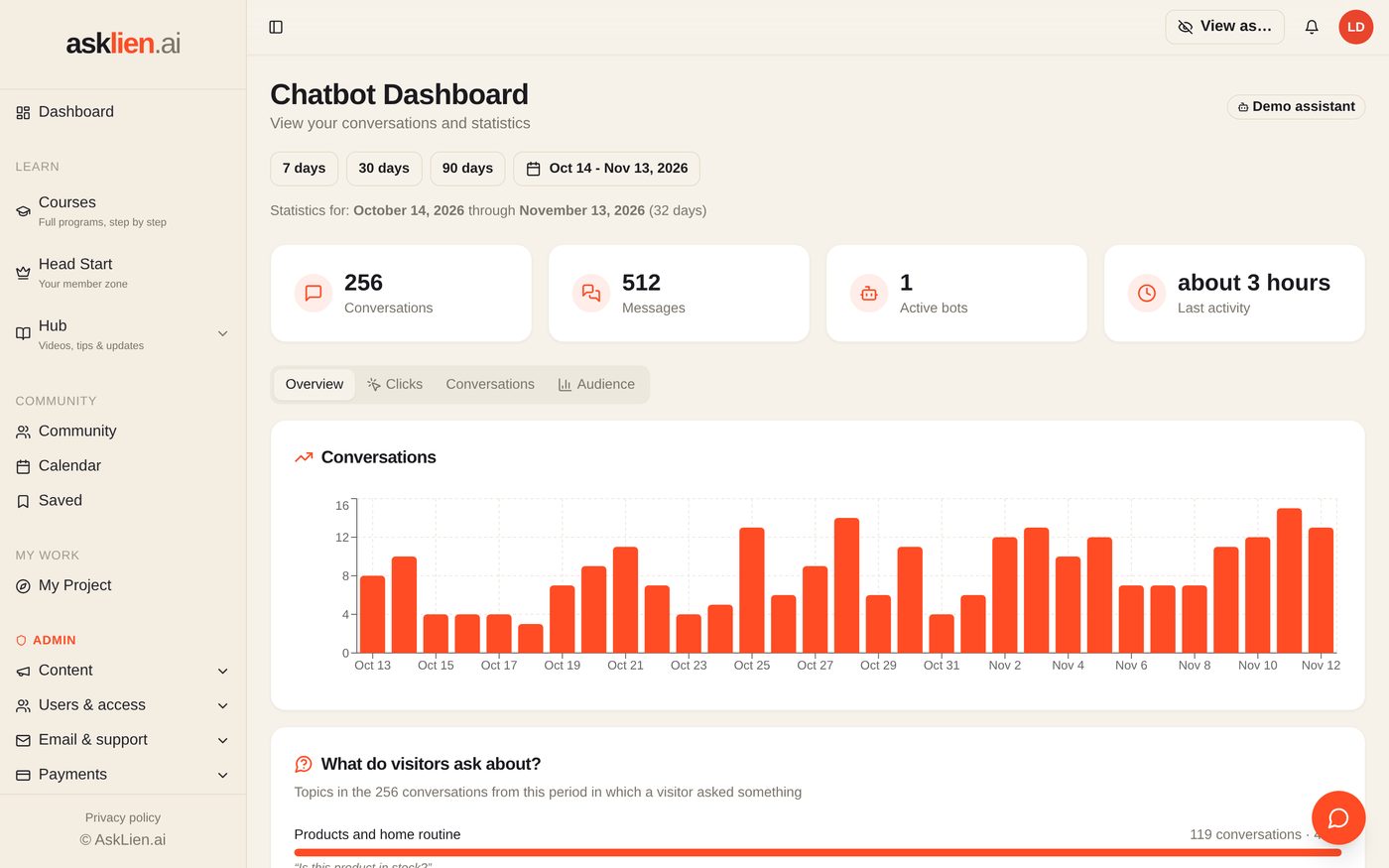
The chatbot dashboard: conversations per day and what visitors ask about.
The AskLien hub · demo data
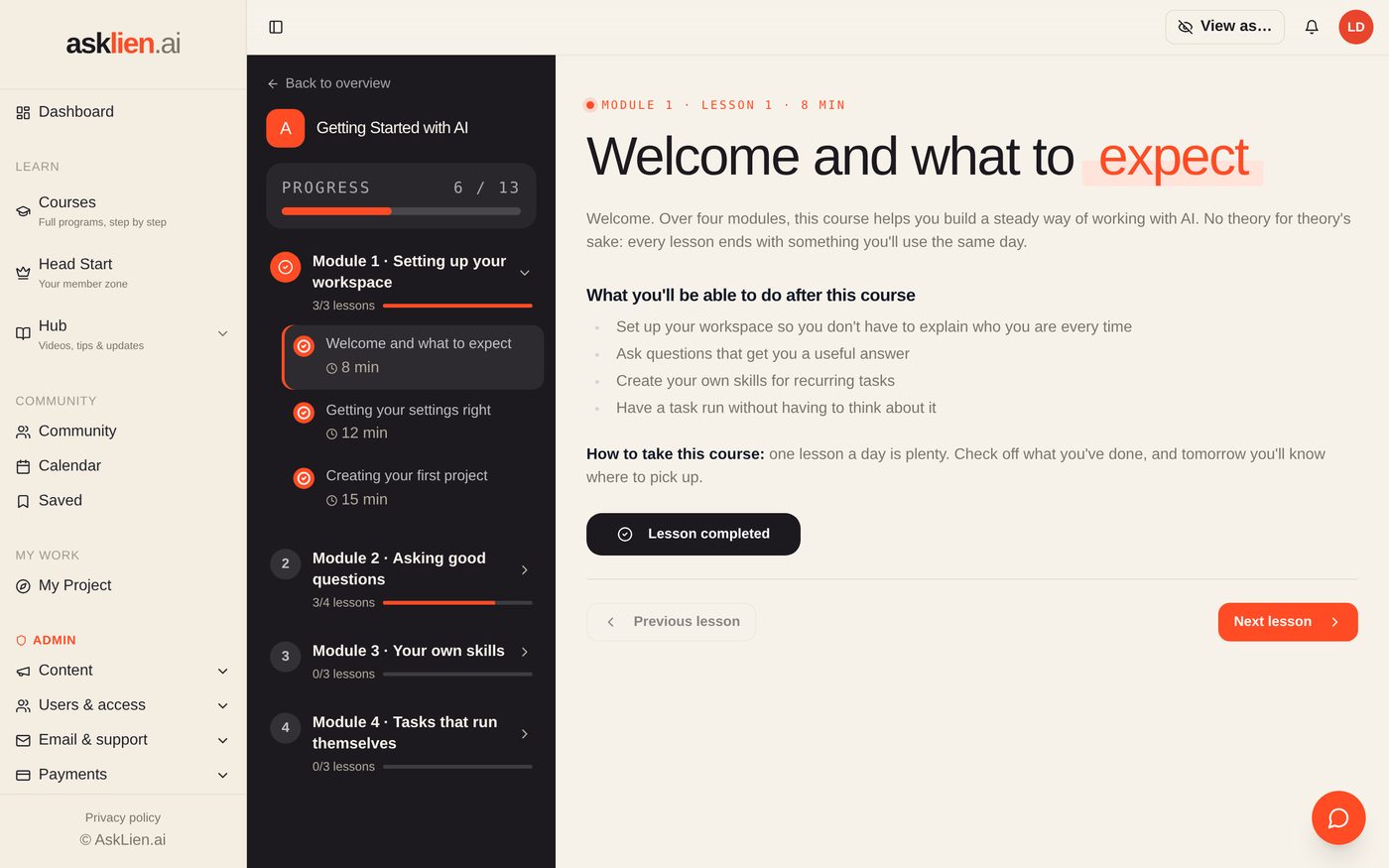
The learning platform: a course with modules and progress.
The AskLien hub · demo data
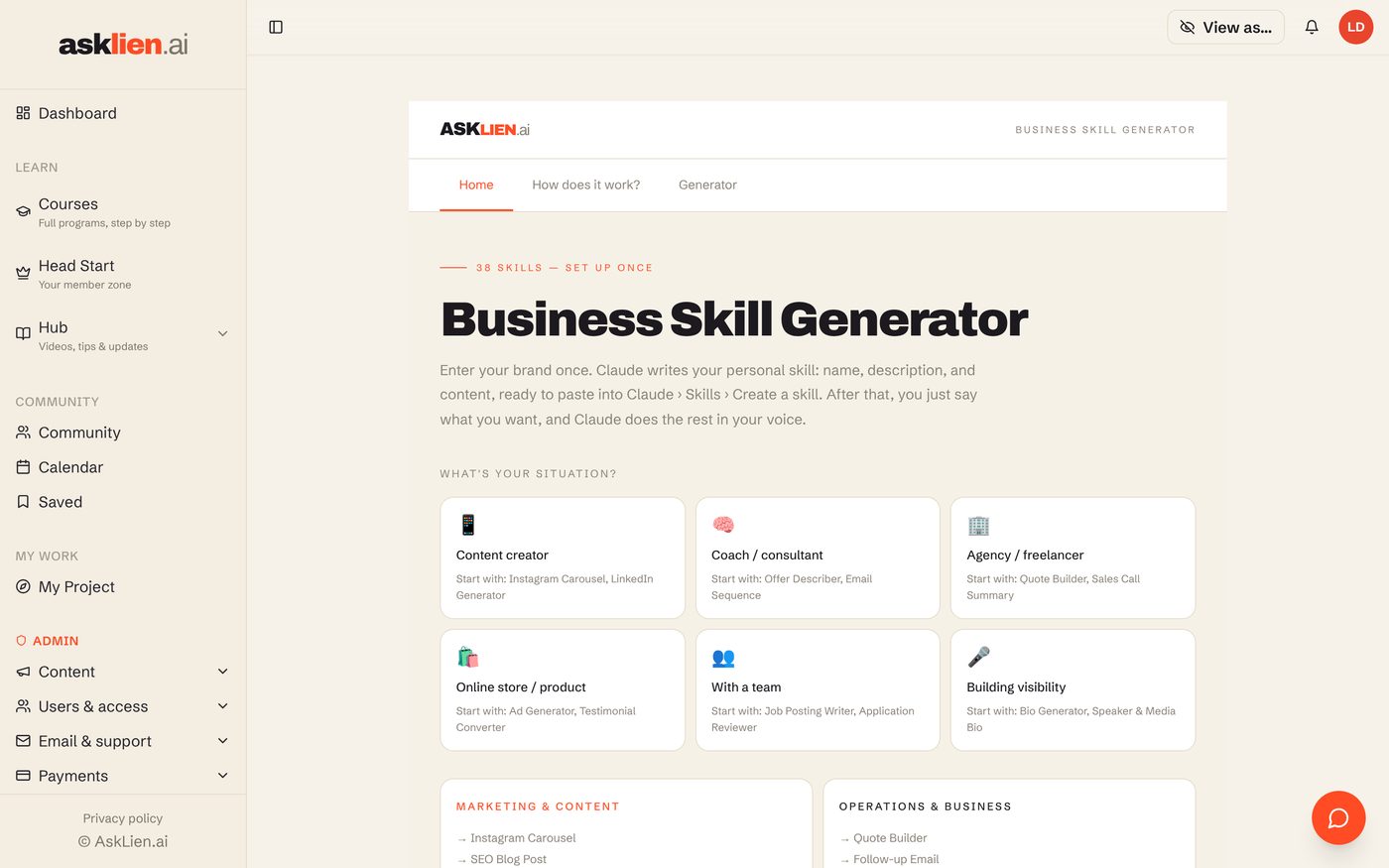
The Skill Generator I built for my members.
The AskLien hub · demo data
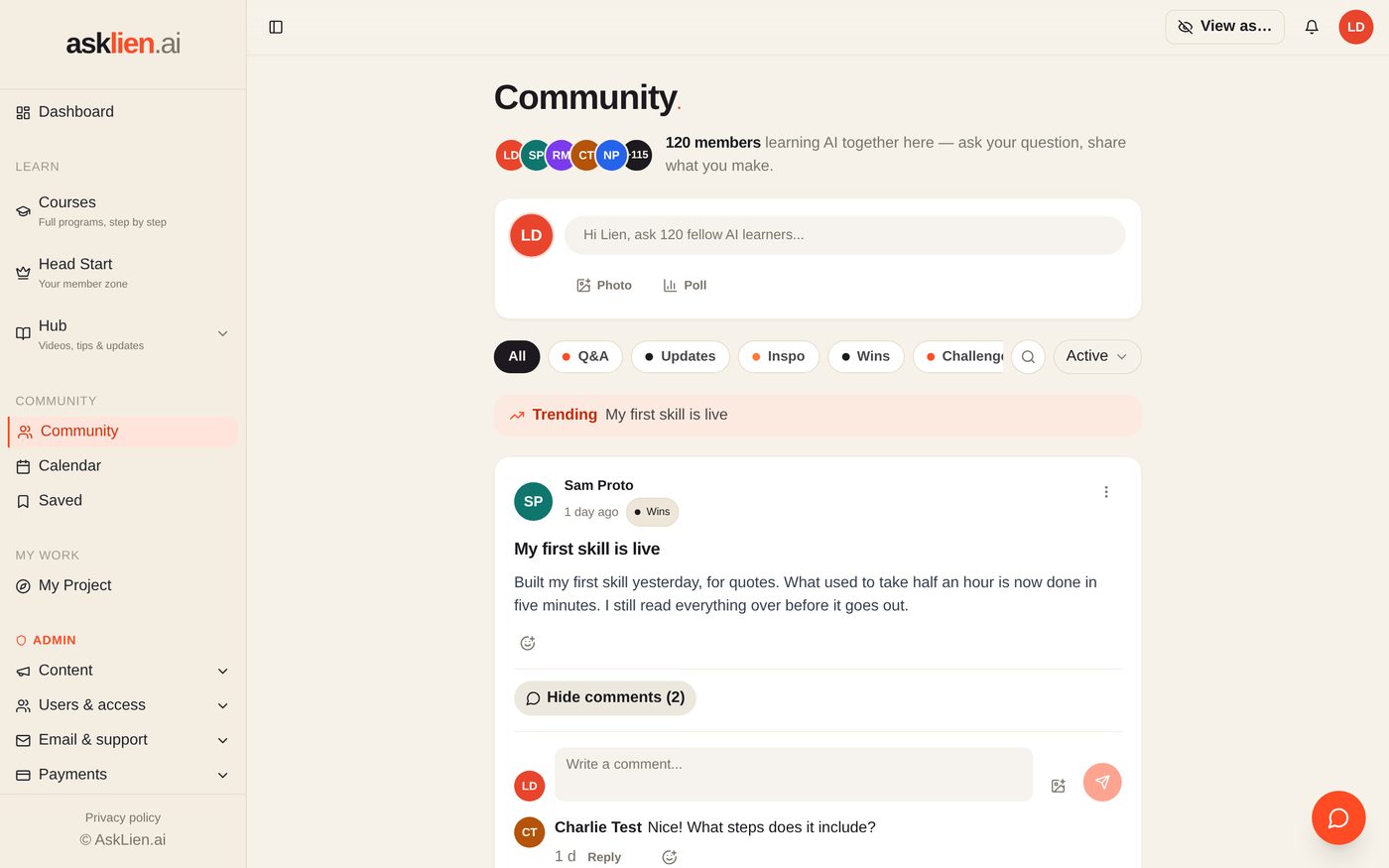
The community, where members show what they've built.

The screens are real, the clients are not  This is the hub itself, run locally on made-up demo data. The client, the members, the tasks and the numbers are fictional. The hub is in Dutch, so we switched the labels to English for this page.

Read the full storyWhy I'm showing this · One project, from inquiry to invoice · What I still do myself
01

Why I'm showing this

Every consultant says AI saves time. Very few show you how their own business runs. I think you should be able to check whether someone uses what she sells.

There's a second reason. Everything I build for a client, I built for myself first. That includes the hub where clients follow their project, the status reports and the chatbot monitoring. My own business is where I find out what works before I set it up anywhere else.

02

One project, from inquiry to invoice

Take an AI audit. Here's what happens and where an agent does the work:

Prep. A skill gets everything ready for the audit day: what I already know about the business, the questions I need to ask, and the tools they use.

The report. After the audit day, a second skill turns my notes and the recording into a report in my standard format. I rewrite it, tighten it and decide what stays.

The agreement. A generator drafts the proposal and the agreement in my style, with my terms.

The project. The client gets a project in my hub with phases and tasks. Every meeting comes in automatically, notes included.

Follow-up. A status report is ready every week showing what got done and what's still open, person by person.

The invoice. A skill handles that too.

03

What I still do myself

The audit day. No agent is involved in that. Watching how people work, asking follow-up questions and picking up on where things aren't working is the job itself.

I also read everything before it goes out. A skill writes the first draft, and I decide what gets sent. The weekly email to my members is prepared as a draft every Monday morning, and it doesn't go out until I've read it.

That's my rule for every agent I build, for myself or for a client: the agent does the prep work, and a person makes the call.
Want to know what could run on its own in your business?

Some things need an agent, some need a workflow, and some just need a better system. An audit sorts out which is which.

Tell me how you work →
04

What runs in my business.

It isn't one big system that does everything. It's a set of small pieces that each do one thing well:

01Skills in Claude

Thirteen of them, each for one task: prepping an audit, writing up a report, a client email, a client file, an agreement, a status report, my newsletter, my morning overview.

02The hub

My learning platform for more than 340 members and my shared workspace with clients. Lessons, community, projects and chatbot monitoring sit behind one login.

03Payment and access

When someone pays, they get an account and a welcome email right away. Nobody has to do anything.

04Emails that run on their own

Welcome emails, access emails, reminders, and notifications when there's feedback on a project. Almost five thousand so far.

05Agents on a schedule

Seven of them. They prep my day, follow up on client calls and turn what I've already written into content.

06The Reel engine

It takes raw footage and turns it into an edited reel with captions, in my own style.

07This website

Built and maintained with Claude Code, including the page you're reading now.

08Chatbot monitoring

Every night the numbers from my clients' chatbots come in, and a check makes sure nobody is over their limit.

What runs on its own here

I use all three, each for what it does best. This is the kind of mix I map out for clients.

AGENTSkills that write the first draft.

An audit report, an agreement, a client email, a status report. The agent writes and I decide.

AGENTThe weekly email to my members.

Prepared as a draft every Monday morning from whatever is new that week.

WORKFLOWPayment, account, welcome email.

One chain, and nobody has to touch it.

WORKFLOWMeetings and nightly checks.

Recordings land in the right project on their own, and chatbot numbers get pulled and checked every night.

PLATFORMThe hub.

Where members learn and clients follow their project.

The full list.

Here's everything running in my business today, by type. Whatever an agent writes comes to me as a draft. Nothing goes out until I've read it.

AGENTS ON A SCHEDULEThey start on their own. I don't have to ask.
Morning overview
Every morning at eight: what's going on today in my inbox, calendar and documents.
Check-ins during the day
Every three hours, a quick look at what came in and what's coming up.
Follow-up after a client call
Every weekday: a summary of that day's calls, what we agreed on, the action items and a draft email to the client. It also puts a reminder on my calendar five days out.
From call to proposal
After an intro call, a draft proposal is waiting for me that evening, written in the prospect's own words. Anything that wasn't said stays blank. The agent isn't allowed to make up prices.
From newsletter to content
Twice a week: three posts, a carousel and two reel scripts based on my latest newsletter.
Content idea of the week
Every Wednesday: the biggest AI news of the week, fact-checked against the source and turned into a carousel.
Weekly summary
Every Friday: what got finished, what was decided and what's still open.
SKILLS ON DEMANDI run them when I need them.
Audit prep and audit report
Two skills: one sets up the audit day, the other turns notes and a recording into a report.
Agreement and invoicing
A proposal, an agreement or an invoice in my format, with my terms.
Client file and client email
Everything about one client in one place, and an email in my voice.
Weekly status report
Where a project stands, person by person.
Newsletter
My weekly newsletter, in my style.
Content and reels
Reworking content into other formats, building carousels, and my own editing style for reels.
My writing style
One skill that keeps my voice consistent. All the others build on it.
WORKFLOWS IN THE HUBNo AI here. These are chains of steps that never skip one.
Payment turns into access
When someone pays, they get an account, the right course and a welcome email.
Reminders
Anyone who hasn't logged in yet gets a nudge. So does anyone who missed a project check-in.
Meetings into projects
Recordings land in the right client project on their own, with the action items pulled out.
Status report per project
Generated automatically every week for every active client.
Notifications
Feedback on a task, a question from a client, a mention in the community: the right person gets notified.
Chatbot monitoring
The numbers are pulled every night, a check runs every morning to see whether a client is at their limit, and an overview goes out every month.
Keeping email lists in sync
Members and course participants end up on the right list automatically.
TOOLS I BUILT MYSELFThings I needed and couldn't find anywhere.
The hub
Learning platform, community, client projects and chatbot dashboard behind one login.
The Skill Generator
A tool in the hub that builds members a skill of their own.
The Reel engine
Edits my footage into reels with captions.
My workspace
My own environment for projects, tasks and time tracking with freelancers. It's still new.
This website
Built and kept up to date with Claude Code.
05

What I've learned

Starting small works better than planning big. My first skill did one thing. I only built the second one after I was using the first every week.

Some things don't need an agent. The payment that creates an account is a plain workflow, and no AI has to think about it. What matters is knowing which one you need when. Figuring that out is what I do in an audit at your business.

06

What I get out of it

I've never tracked my hours, so I won't put a number on it. Here's what I do know:

Staying small while doing a lot.Courses, client projects and a community, run by a small team.
No client falls through the cracks.Every project gets a status update every week, even when I'm traveling.
My style stays consistent.A report or an agreement always looks like it came from me.
My time goes to people.If an agent can prep it, I don't prep it anymore.
I know what I'm selling.I've watched every piece I recommend fail and then work.
It stays current.When a tool ships a new version, I update my own setup first.
Want this setup too?

I can set up what runs in my business in yours, fitted to how you work.

Get in touch →
07

And it keeps growing

Every month something gets added or dropped. If I stop using something, I remove it. A setup that only ever grows ends up as messy as the problem you started with.

The timeline

How an AI audit works

Most projects start the same way, and it doesn't take months to get going:

01Intro call

You tell me what you do and where you're stuck. I'll tell you straight whether an audit makes sense or whether something smaller would do the job.

02One day on site

I come to where the work happens and watch. How does work come in? Who decides what? Where does the time go? Which tools are you already paying for?

03The report

Within a week you get a report: where time and money are leaking, your priorities in order, a review of your tools, and concrete proposals in more than one size.

04You decide

Do all of it, part of it, or none of it. If you move ahead with a build, the audit fee is credited in full.

05We build in phases

Your team tests as we go. Nothing ships until the people who'll use it have tried it.

06Retainer

If you want it to keep running and keep growing, we look after it on a fixed monthly retainer.

An AI audit costs $2,000, credited in full if you move ahead with a build.

Book your audit day →

Wondering what this could look like for your business?

It starts with a conversation. You tell me where you're stuck, and I'll tell you what I'd do and what it would cost.